

There are additional fees involved with TEFCA IAS in
live mode. Please contact support@fastenhealth.com or your Account Representative for more informationWhat is TEFCA IAS?
TEFCA (Trusted Exchange Framework and Common Agreement) is a framework designed to enable the secure and seamless exchange of health information across the United States. The Individual Access Services (IAS) mode under TEFCA allows patients to access their own health information electronically and share it with third-party applications or services. Fasten Health supports a number of different mechanisms for retrieving medical records on behalf of patients, including TEFCA IAS. Here’s a short example of what the Fasten Connect widget looks like in TEFCA IAS mode:General Flow for Developers
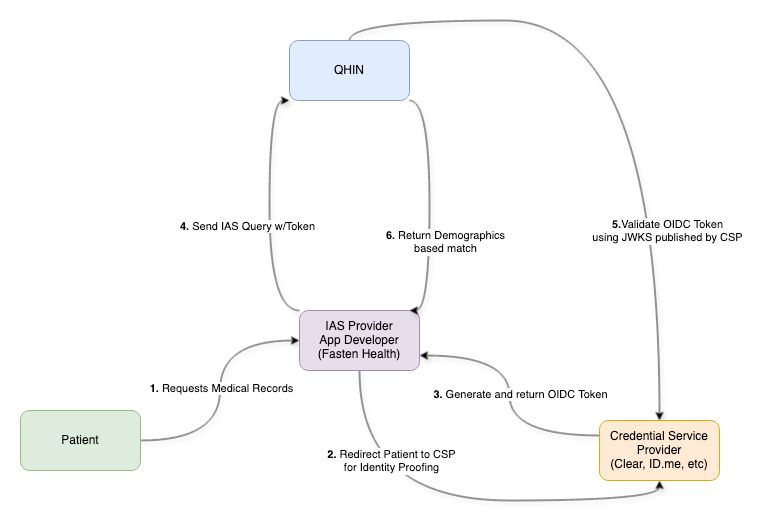
From a developer’s perspective, here’s what’s happening under the hood when records flow through Fasten:- QHIN Integration Fasten connects with a Qualified Health Information Network (QHIN). QHINs are essentially the access points to the TEFCA framework. They provide the network APIs and routing needed to reach records across participating health systems.
- Identity Verification via CSPs To ensure patients are who they say they are, Fasten relies on Credential Service Providers (CSPs) certified by the Kantara Initiative. These vendors verify patient identity using government ID + facial match and return an OpenID Connect Token containing verified attributes (e.g., name, DOB).
- Secure Data Requests When Fasten queries the QHIN for records, it attaches the patient’s OpenID Connect Token. The QHIN (and any downstream nodes) validate the token using the public key published by the CSP. This ensures requests are tied to a verified patient identity and trusted by the network.
- Record Retrieval Once validated, Fasten can retrieve longitudinal health records from the appropriate source system through the QHIN, normalize them, and make them available via our unified API.
Enable Tefca Mode
If you’ve already followed our Quickstart Guide, all you need to do is set thetefca-mode attribute to true on the <fasten-stitch-element> tag.
There are additional fees involved with TEFCA IAS in
live mode.
Please contact support@fastenhealth.com or your Account Representative for more informationDifferences
- Patient experience – Catalog search and portal credential prompts are skipped. Patients are taken directly into a TEFCA IAS identity-proofing flow (CLEAR or ID.me), so adjust your in-product copy and support content to set that expectation before the widget launches.
- Event/webhook payloads – When TEFCA mode is on,
endpoint_id,portal_id, andbrand_idare often omitted from client events as well aspatient.connection_*webhooks. Persisttefca_directory_idwhen it is returned so you still have a stable identifier for branding or analytics, and verify code paths that previously assumed the other catalog identifiers were always populated. - Scopes – TEFCA connections always return a
scopevalue ofpatient/*.read. If you surface granted scopes to users or use them for authorization logic, rely on this fixed scope string and remove assumptions about per-EHR variability. - No-records failure behavior – TEFCA-enabled exports may fail with
failure_reason: tefca_no_documents_foundin thepatient.ehi_export_failedwebhook. This means the health system did not return any records for the individual. It is frequently seen intestmode, but is uncommon inlivemode. If you are testing the API workflow, you can setfixtures.tefca_ccdaon the EHI Export request to receive a known synthetic response instead of relying on the upstream test system to return data.
Example Test Patients
To help developers test their integration with TEFCA IAS, we provide the following example test patients. These test patients simulate real-world scenarios and can be used to validate your implementation.Test Patient Demographics
Test Patient Demographics
Clear Test Patients
CLEAR’s verification process in TEFCA mode uses the following patient identifiers to automatically match the test patients in the table above:
source
ID.me Test Patients
Most of the ID.me synthetic identities are not functional. ID.me is working to resolve this issue. Please use the CLEAR identities above to test in TEFCA mode.
How to Use Test Patients
- Embed the Fasten Connect widget in your application with TEFCA IAS mode enabled.
- Log in with the provided email address
- When prompted to provide identity verification (using Clear or ID.me), use the corresponding phone number + email address (for CLEAR) or email address + password (for ID.me)
- Follow the flow to authenticate, consent, and retrieve data.
Use Fixtures for Deterministic Test Exports
When you are testing TEFCA IAS with the API workflow, the TEFCA environment will often return no documents for synthetic users. In that case, the EHI Export job may fail withfailure_reason: tefca_no_documents_found even though your integration is working correctly.
To avoid that during testing, pass the fixtures.tefca_ccda option when calling POST /bridge/fhir/ehi-export. This tells Fasten to return a specific synthetic CCDA payload for the export instead of depending on the TEFCA test network to return records.
This option is only available in test mode.
fixtures.tefca_ccda:
myra-jones.xmllennie-connell.xmlmyra-jones-v2.xmlmyra-jones-v7.xmlbernice-maxwell.xml
Reset Synthetic Patients Between Runs
When you finish an end-to-end scenario, that synthetic patient now has active vault connections. Before running another test, clear those connections by calling the helper endpointPOST /bridge/vault_connection/revoke.
- Authenticate with HTTP Basic auth using your test mode public id/private key; live credentials are rejected.
- Pass the
emailof the synthetic patient you want to reset (see the table above). - All vault connections for that patient are revoked so the next run starts from a clean slate.
If you encounter any issues or need further assistance, contact our support team at support@fastenhealth.com.