> ## Documentation Index
> Fetch the complete documentation index at: https://docs.connect.fastenhealth.com/llms.txt
> Use this file to discover all available pages before exploring further.
# TEFCA IAS Developer Guide
> Learn about TEFCA IAS mode, its flow, and how to test with example patients.
There are additional fees involved with TEFCA IAS in `live` mode. Please contact [support@fastenhealth.com](mailto:support@fastenhealth.com) or your [Account Representative](https://calendly.com/jason-kulatunga/30min) for more information
## What is TEFCA IAS?
TEFCA (Trusted Exchange Framework and Common Agreement) is a framework designed to enable the secure and seamless exchange
of health information across the United States. The **Individual Access Services (IAS)** mode under TEFCA allows patients
to access their own health information electronically and share it with third-party applications or services.
Fasten Health supports a number of different mechanisms for retrieving medical records on behalf of patients, including TEFCA IAS.
Here's a short example of what the Fasten Connect widget looks like in TEFCA IAS mode:
***
## General Flow for Developers
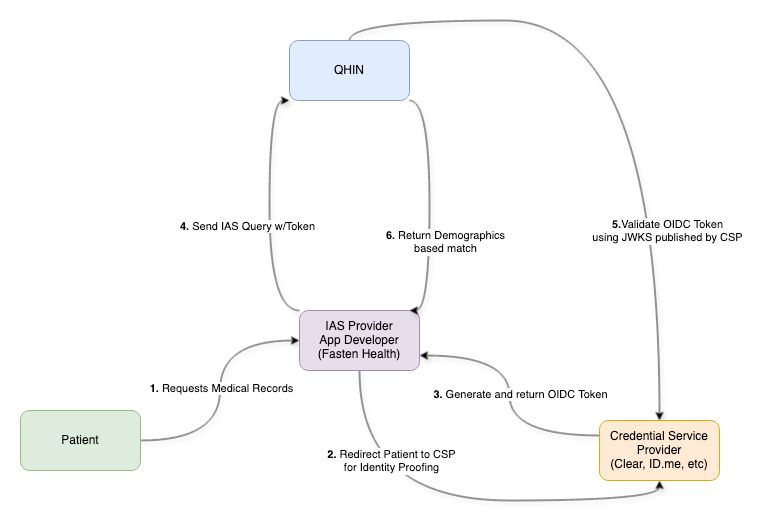
From a developer’s perspective, here’s what’s happening under the hood when records flow through Fasten:
1. **QHIN Integration**
Fasten connects with a Qualified Health Information Network (QHIN). QHINs are essentially the access points to the TEFCA
framework. They provide the network APIs and routing needed to reach records across participating health systems.
2. **Identity Verification via CSPs**
To ensure patients are who they say they are, Fasten relies on Credential Service Providers (CSPs) certified by the Kantara
Initiative. These vendors verify patient identity using government ID + facial match and return an OpenID Connect Token
containing verified attributes (e.g., name, DOB).
3. **Secure Data Requests**
When Fasten queries the QHIN for records, it attaches the patient’s OpenID Connect Token. The QHIN
(and any downstream nodes) validate the token using the public key published by the CSP. This ensures requests are
tied to a verified patient identity and trusted by the network.
4. **Record Retrieval**
Once validated, Fasten can retrieve longitudinal health records from the appropriate source system through the QHIN,
normalize them, and make them available via our unified API.
Why it matters:
For developers, none of this extra wiring is something you need to implement. Fasten handles the QHIN partnerships,
identity assurance, token validation, and data normalization so your integration stays simple: a single API call to us.
 ***
## Enable Tefca Mode
If you've already followed our [Quickstart Guide](https://docs.connect.fastenhealth.com/quickstart), all you need to do is
set the `tefca-mode` attribute to `true` on the `` tag.
```html theme={null}
```
Cookies are required when using TEFCA IAS mode. If you are evaluating TEFCA mode while hosting your app on `localhost`, browser security sandboxing can restrict cookies and cause the flow to fail. Similar cookie restrictions can occur when testing in private browsing or incognito mode.
Yes, it's that simple!
There are additional fees involved with TEFCA IAS in `live` mode.
Please contact [support@fastenhealth.com](mailto:support@fastenhealth.com) or your [Account Representative](https://calendly.com/jason-kulatunga/30min) for more information
## Differences
* **Patient experience** – Catalog search and portal credential prompts are skipped. Patients are taken directly into a TEFCA IAS identity-proofing flow (CLEAR or ID.me), so adjust your in-product copy and support content to set that expectation before the widget launches.
* **Event/webhook payloads** – When TEFCA mode is on, `endpoint_id`, `portal_id`, and `brand_id` are often omitted from client events as well as `patient.connection_*` webhooks. Persist `tefca_directory_id` when it is returned so you still have a stable identifier for branding or analytics, and verify code paths that previously assumed the other catalog identifiers were always populated.
* **Scopes** – TEFCA connections always return a `scope` value of `patient/*.read`. If you surface granted scopes to users or use them for authorization logic, rely on this fixed scope string and remove assumptions about per-EHR variability.
* **No-records failure behavior** – TEFCA-enabled exports may fail with `failure_reason: tefca_no_documents_found` in the [`patient.ehi_export_failed`](/webhooks/events#patient-ehi_export_failed) webhook. This means the health system did not return any records for the individual. It is frequently seen in `test` mode, but is uncommon in `live` mode. If you are testing the API workflow, you can set `fixtures.tefca_ccda` on the EHI Export request to receive a known synthetic response instead of relying on the upstream test system to return data.
## Example Test Patients
To help developers test their integration with TEFCA IAS, we provide the following example test patients. These test patients
simulate real-world scenarios and can be used to validate your implementation.
| Name | Phone | Email | DOB | Gender | Address |
| ---------------------- | ------------ | ------------------------------------------------------------- | ---------- | ------ | --------------------------------------------------- |
| Allison Hackett | 608-555-1243 | [ahackett@gmail.com](mailto:ahackett@gmail.com) | 01/15/1987 | Female | 1325 Main St, Madison, WI, US 57303 |
| Damon Mychart | 608-211-3314 | [dmychart@gmail.com](mailto:dmychart@gmail.com) | 07/26/1979 | Male | 308 Oak St, Madison, WI, US 53711 |
| **Dog Beaker** | 410-707-2690 | [dogbeaker@aol.com](mailto:dogbeaker@aol.com) | 11/24/1985 | Male | 124 Lake Street, Vernon, CT, US 06066 |
| Barbara Testa | 831-600-3769 | [btesta@hotmail.com](mailto:btesta@hotmail.com) | 05/24/1947 | Female | 8855 Orchid Blvd, Reading, PA, US 19602 |
| Tracy CraneTest | 222-360-1564 | [tcranetest@gmail.com](mailto:tcranetest@gmail.com) | 12/26/1936 | Female | 458 Streich Street Lunenburg, MA, US 01462 |
| **Camila Maria Lopez** | 469-469-4321 | [knixontestemail@epic.com](mailto:knixontestemail@epic.com) | 09/12/1987 | Female | 3268 West Johnson St. Apt 117 Garland, TX, US 75043 |
| Derrick Lin | 785-785-4321 | [knixontestemail2@epic.com](mailto:knixontestemail2@epic.com) | 06/3/1973 | Male | 7324 Roosevelt Ave Indianapolis, IN, US 46201 |
| Homer J Simpson | 217-123-3608 | [hsimpson@gmail.com](mailto:hsimpson@gmail.com) | 02/9/1975 | Male | 742 Evergreen Terrace Madison, WI, US 53711 |
### Clear Test Patients
CLEAR's verification process in TEFCA mode uses the following patient identifiers to automatically match the test patients in the table above:
| Name | Phone | Email |
| ---------------------- | ------------ | ------------------------------------------------------------- |
| Allison Hackett | 608-555-1243 | [ahackett@gmail.com](mailto:ahackett@gmail.com) |
| Damon Mychart | 608-211-3314 | [dmychart@gmail.com](mailto:dmychart@gmail.com) |
| **Dog Beaker** | 410-707-2690 | [dogbeaker@aol.com](mailto:dogbeaker@aol.com) |
| Barbara Testa | 831-600-3769 | [btesta@hotmail.com](mailto:btesta@hotmail.com) |
| Tracy CraneTest | 222-360-1564 | [tcranetest@gmail.com](mailto:tcranetest@gmail.com) |
| **Camila Maria Lopez** | 469-469-4321 | [knixontestemail@epic.com](mailto:knixontestemail@epic.com) |
| Derrick Lin | 785-785-4321 | [knixontestemail2@epic.com](mailto:knixontestemail2@epic.com) |
| Homer J Simpson | 217-123-3608 | [hsimpson@gmail.com](mailto:hsimpson@gmail.com) |
[source](https://docs.clearme.com/docs/synthetic-test-patients)
### ID.me Test Patients
Most of the ID.me synthetic identities are not functional. ID.me is working to resolve this issue. Please use the CLEAR identities above to test in TEFCA mode.
ID.me verification process in TEFCA mode is based on a username and password. The following test users are available:
| Name | Email | Password |
| ---------------------- | ------------------------------------------------------------- | ---------- |
| Allison Hackett | [ahackett@gmail.com](mailto:ahackett@gmail.com) | IDme2026!! |
| Damon Mychart | [dmychart@me.com](mailto:dmychart@me.com) | IDme2026!! |
| **Dog Beaker** | [dogbeaker@aol.com](mailto:dogbeaker@aol.com) | IDme2026!! |
| Barbara Testa | [btesta@hotmail.com](mailto:btesta@hotmail.com) | IDme2026!! |
| Tracy CraneTest | [tcranetest@gmail.com](mailto:tcranetest@gmail.com) | IDme2026!! |
| **Camila Maria Lopez** | [knixontestemail@epic.com](mailto:knixontestemail@epic.com) | IDme2026!! |
| Derrick Lin | [knixontestemail2@epic.com](mailto:knixontestemail2@epic.com) | IDme2026!! |
| Homer J Simpson | [hsimpson@gmail.com](mailto:hsimpson@gmail.com) | IDme2026!! |
### How to Use Test Patients
1. Embed the Fasten Connect widget in your application with TEFCA IAS mode enabled.
2. Log in with the provided email address
3. When prompted to provide identity verification (using Clear or ID.me), use the corresponding phone number + email address (for CLEAR) or email address + password (for ID.me)
4. Follow the flow to authenticate, consent, and retrieve data.
### Use Fixtures for Deterministic Test Exports
When you are testing TEFCA IAS with the API workflow, the TEFCA environment will often return no documents for synthetic users. In that case, the EHI Export job may fail with `failure_reason: tefca_no_documents_found` even though your integration is working correctly.
To avoid that during testing, pass the `fixtures.tefca_ccda` option when calling [`POST /bridge/fhir/ehi-export`](/api-reference/ehi_export/create). This tells Fasten to return a specific synthetic CCDA payload for the export instead of depending on the TEFCA test network to return records.
This option is only available in `test` mode.
```json theme={null}
{
"org_connection_id": "xxxxx",
"fixtures": {
"tefca_ccda": "myra-jones.xml"
}
}
```
Available values for `fixtures.tefca_ccda`:
* `myra-jones.xml`
* `lennie-connell.xml`
### Reset Synthetic Patients Between Runs
When you finish an end-to-end scenario, that synthetic patient now has active vault connections. Before running another test, clear those connections by calling the helper endpoint `POST /bridge/vault_connection/revoke`.
* Authenticate with HTTP Basic auth using your **test** mode public id/private key; live credentials are rejected.
* Pass the `email` of the synthetic patient you want to reset (see the table above).
* All vault connections for that patient are revoked so the next run starts from a clean slate.
```bash theme={null}
curl -X POST https://api.connect.fastenhealth.com/v1/bridge/vault_connection/revoke \
-u "public_test_xxxxxxxxxx:private_test_xxxxxxxxxx" \
-H "Content-Type: application/json" \
-d '{
"email": "dogbeaker@aol.com"
}'
```
***
If you encounter any issues or need further assistance, contact our support team at [support@fastenhealth.com](mailto:support@fastenhealth.com).
***
## Enable Tefca Mode
If you've already followed our [Quickstart Guide](https://docs.connect.fastenhealth.com/quickstart), all you need to do is
set the `tefca-mode` attribute to `true` on the `` tag.
```html theme={null}
```
Cookies are required when using TEFCA IAS mode. If you are evaluating TEFCA mode while hosting your app on `localhost`, browser security sandboxing can restrict cookies and cause the flow to fail. Similar cookie restrictions can occur when testing in private browsing or incognito mode.
Yes, it's that simple!
There are additional fees involved with TEFCA IAS in `live` mode.
Please contact [support@fastenhealth.com](mailto:support@fastenhealth.com) or your [Account Representative](https://calendly.com/jason-kulatunga/30min) for more information
## Differences
* **Patient experience** – Catalog search and portal credential prompts are skipped. Patients are taken directly into a TEFCA IAS identity-proofing flow (CLEAR or ID.me), so adjust your in-product copy and support content to set that expectation before the widget launches.
* **Event/webhook payloads** – When TEFCA mode is on, `endpoint_id`, `portal_id`, and `brand_id` are often omitted from client events as well as `patient.connection_*` webhooks. Persist `tefca_directory_id` when it is returned so you still have a stable identifier for branding or analytics, and verify code paths that previously assumed the other catalog identifiers were always populated.
* **Scopes** – TEFCA connections always return a `scope` value of `patient/*.read`. If you surface granted scopes to users or use them for authorization logic, rely on this fixed scope string and remove assumptions about per-EHR variability.
* **No-records failure behavior** – TEFCA-enabled exports may fail with `failure_reason: tefca_no_documents_found` in the [`patient.ehi_export_failed`](/webhooks/events#patient-ehi_export_failed) webhook. This means the health system did not return any records for the individual. It is frequently seen in `test` mode, but is uncommon in `live` mode. If you are testing the API workflow, you can set `fixtures.tefca_ccda` on the EHI Export request to receive a known synthetic response instead of relying on the upstream test system to return data.
## Example Test Patients
To help developers test their integration with TEFCA IAS, we provide the following example test patients. These test patients
simulate real-world scenarios and can be used to validate your implementation.
| Name | Phone | Email | DOB | Gender | Address |
| ---------------------- | ------------ | ------------------------------------------------------------- | ---------- | ------ | --------------------------------------------------- |
| Allison Hackett | 608-555-1243 | [ahackett@gmail.com](mailto:ahackett@gmail.com) | 01/15/1987 | Female | 1325 Main St, Madison, WI, US 57303 |
| Damon Mychart | 608-211-3314 | [dmychart@gmail.com](mailto:dmychart@gmail.com) | 07/26/1979 | Male | 308 Oak St, Madison, WI, US 53711 |
| **Dog Beaker** | 410-707-2690 | [dogbeaker@aol.com](mailto:dogbeaker@aol.com) | 11/24/1985 | Male | 124 Lake Street, Vernon, CT, US 06066 |
| Barbara Testa | 831-600-3769 | [btesta@hotmail.com](mailto:btesta@hotmail.com) | 05/24/1947 | Female | 8855 Orchid Blvd, Reading, PA, US 19602 |
| Tracy CraneTest | 222-360-1564 | [tcranetest@gmail.com](mailto:tcranetest@gmail.com) | 12/26/1936 | Female | 458 Streich Street Lunenburg, MA, US 01462 |
| **Camila Maria Lopez** | 469-469-4321 | [knixontestemail@epic.com](mailto:knixontestemail@epic.com) | 09/12/1987 | Female | 3268 West Johnson St. Apt 117 Garland, TX, US 75043 |
| Derrick Lin | 785-785-4321 | [knixontestemail2@epic.com](mailto:knixontestemail2@epic.com) | 06/3/1973 | Male | 7324 Roosevelt Ave Indianapolis, IN, US 46201 |
| Homer J Simpson | 217-123-3608 | [hsimpson@gmail.com](mailto:hsimpson@gmail.com) | 02/9/1975 | Male | 742 Evergreen Terrace Madison, WI, US 53711 |
### Clear Test Patients
CLEAR's verification process in TEFCA mode uses the following patient identifiers to automatically match the test patients in the table above:
| Name | Phone | Email |
| ---------------------- | ------------ | ------------------------------------------------------------- |
| Allison Hackett | 608-555-1243 | [ahackett@gmail.com](mailto:ahackett@gmail.com) |
| Damon Mychart | 608-211-3314 | [dmychart@gmail.com](mailto:dmychart@gmail.com) |
| **Dog Beaker** | 410-707-2690 | [dogbeaker@aol.com](mailto:dogbeaker@aol.com) |
| Barbara Testa | 831-600-3769 | [btesta@hotmail.com](mailto:btesta@hotmail.com) |
| Tracy CraneTest | 222-360-1564 | [tcranetest@gmail.com](mailto:tcranetest@gmail.com) |
| **Camila Maria Lopez** | 469-469-4321 | [knixontestemail@epic.com](mailto:knixontestemail@epic.com) |
| Derrick Lin | 785-785-4321 | [knixontestemail2@epic.com](mailto:knixontestemail2@epic.com) |
| Homer J Simpson | 217-123-3608 | [hsimpson@gmail.com](mailto:hsimpson@gmail.com) |
[source](https://docs.clearme.com/docs/synthetic-test-patients)
### ID.me Test Patients
Most of the ID.me synthetic identities are not functional. ID.me is working to resolve this issue. Please use the CLEAR identities above to test in TEFCA mode.
ID.me verification process in TEFCA mode is based on a username and password. The following test users are available:
| Name | Email | Password |
| ---------------------- | ------------------------------------------------------------- | ---------- |
| Allison Hackett | [ahackett@gmail.com](mailto:ahackett@gmail.com) | IDme2026!! |
| Damon Mychart | [dmychart@me.com](mailto:dmychart@me.com) | IDme2026!! |
| **Dog Beaker** | [dogbeaker@aol.com](mailto:dogbeaker@aol.com) | IDme2026!! |
| Barbara Testa | [btesta@hotmail.com](mailto:btesta@hotmail.com) | IDme2026!! |
| Tracy CraneTest | [tcranetest@gmail.com](mailto:tcranetest@gmail.com) | IDme2026!! |
| **Camila Maria Lopez** | [knixontestemail@epic.com](mailto:knixontestemail@epic.com) | IDme2026!! |
| Derrick Lin | [knixontestemail2@epic.com](mailto:knixontestemail2@epic.com) | IDme2026!! |
| Homer J Simpson | [hsimpson@gmail.com](mailto:hsimpson@gmail.com) | IDme2026!! |
### How to Use Test Patients
1. Embed the Fasten Connect widget in your application with TEFCA IAS mode enabled.
2. Log in with the provided email address
3. When prompted to provide identity verification (using Clear or ID.me), use the corresponding phone number + email address (for CLEAR) or email address + password (for ID.me)
4. Follow the flow to authenticate, consent, and retrieve data.
### Use Fixtures for Deterministic Test Exports
When you are testing TEFCA IAS with the API workflow, the TEFCA environment will often return no documents for synthetic users. In that case, the EHI Export job may fail with `failure_reason: tefca_no_documents_found` even though your integration is working correctly.
To avoid that during testing, pass the `fixtures.tefca_ccda` option when calling [`POST /bridge/fhir/ehi-export`](/api-reference/ehi_export/create). This tells Fasten to return a specific synthetic CCDA payload for the export instead of depending on the TEFCA test network to return records.
This option is only available in `test` mode.
```json theme={null}
{
"org_connection_id": "xxxxx",
"fixtures": {
"tefca_ccda": "myra-jones.xml"
}
}
```
Available values for `fixtures.tefca_ccda`:
* `myra-jones.xml`
* `lennie-connell.xml`
### Reset Synthetic Patients Between Runs
When you finish an end-to-end scenario, that synthetic patient now has active vault connections. Before running another test, clear those connections by calling the helper endpoint `POST /bridge/vault_connection/revoke`.
* Authenticate with HTTP Basic auth using your **test** mode public id/private key; live credentials are rejected.
* Pass the `email` of the synthetic patient you want to reset (see the table above).
* All vault connections for that patient are revoked so the next run starts from a clean slate.
```bash theme={null}
curl -X POST https://api.connect.fastenhealth.com/v1/bridge/vault_connection/revoke \
-u "public_test_xxxxxxxxxx:private_test_xxxxxxxxxx" \
-H "Content-Type: application/json" \
-d '{
"email": "dogbeaker@aol.com"
}'
```
***
If you encounter any issues or need further assistance, contact our support team at [support@fastenhealth.com](mailto:support@fastenhealth.com).